
# 发布npm包到github
# 1️⃣ 创建你的 npm 包
mkdir my-package
cd my-package
npm init -y
然后你可以创建一个简单的入口文件 index.js:
// index.js
function greet(name) {
  return `Hello, ${name}!`;
}

module.exports = { greet };
修改 package.json,加上 repository 和 publishConfig:
{
  "name": "@yan-sheng-li/demo-package",
  "version": "1.0.0",
  "main": "index.js",
  "scripts": {
    "test": "echo \"Error: no test specified\" && exit 1"
  },
  "keywords": ["demo", "github", "package"],
  "author": "Yan Sheng Li <your_email@example.com>",
  "license": "ISC",
  "description": "A demo npm package hosted on GitHub Packages",
  "repository": {
    "type": "git",
    "url": "git+https://github.com/yan-sheng-li/demo-package.git"
  },
  "publishConfig": {
    "registry": "https://npm.pkg.github.com/"
  }
}
⚠️ 注意:
name必须带上你的 GitHub 用户名作为 scope,如@your-username/my-package。
# 2️⃣ 创建 GitHub Token
- 登录 GitHub → Settings → Developer settings → Personal access tokens → Tokens (classic)
- 点击 Generate new token
- 选择权限:
repo(访问仓库) +write:packages+read:packages
- 选择权限:
- 生成 token 并复制
# 3️⃣ 登录 GitHub Packages
在项目目录运行:
npm login --registry=https://npm.pkg.github.com
# Username: 你的 GitHub 用户名
# Password: 上一步生成的 token
# Email: 你的邮箱
# 4️⃣ 发布包
npm publish
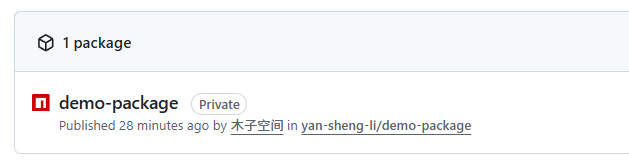
发布成功后,你的包就存在 GitHub Packages 上了。
# 5️⃣ 安装和使用你的包
在另一个项目中:
- 创建
.npmrc文件,指定 registry:
@your-username:registry=https://npm.pkg.github.com
- 安装包:
npm install @your-username/my-package
- 使用:
const { greet } = require('@your-username/my-package');

console.log(greet('Alice')); // Hello, Alice!
💡 小提示
- 每次更新版本需要修改
package.json的version,否则npm publish会报错。 - 可以在 GitHub 上用 Releases 管理版本。
- 生产环境一般推荐发布到 npm 官方仓库,GitHub Packages 适合私有包或团队内部使用。
# 📌关于
如果发布的包要依赖别的环境,需要指明
| 类型 | 适用场景 | npm publish 时作用 |
|---|---|---|
dependencies | 组件运行必须的依赖,比如 Element Plus 的组件 | 会被自动安装到使用你包的项目里 |
peerDependencies | 组件依赖的库,但希望使用者自己提供版本 | 发布时不会打包安装,使用者需要安装 |
devDependencies | 仅开发、测试、构建时需要 | 发布时不会安装 |
# 最终效果
- 你的组件开发工程:
npm install element-plus --save-dev
- package.json:
{
  "devDependencies": {
    "element-plus": "^2.3.0"
  },
  "peerDependencies": {
    "element-plus": "^2.3.0"
  }
}
- 别人安装你的包时,npm 会提示缺少 peerDependencies,需要手动安装:
npm install element-plus
← Pinia使用笔记 项目从npm到pnpm →